Mail Presort Suite
Comprehensive mailing presort software

In July, BCC Software announced the release of a new EDDM® list creation tool in BCC Mail Manager™. This month we wanted to further spotlight this and discuss how to utilize it. This tool allows users to painlessly and quickly create and prepare an EDDM list based on a user selected list of ZIP Codes™ and Carrier Routes. Previously, users had to manually create or import a list prepared for EDDM. This required end users to create their own list of ZIP Codes™, Carrier Routes and counts, and then translate those lists in presort or import them into individual EDDM records. With the new tool users do not have to prepare anything in advance except for a list of what ZIP Codes and carrier routes need to be hit. The counts and other information are all pulled from the USPS® DSF2® tables inside BCC Mail Manager.
To manually use this tool, simply start with File > New List > EDDM. This will bring up the below page which allows users to create their own EDDM list using the default or a user created template.
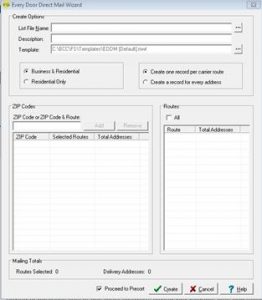
The first things that need to be set are the List Name and Description. Just like when you create a new list from template, blank or dbase you must identify this list for future use. Next, decide on the template. As mentioned, you can use the default template provided by BCC Mail Manager. Alternatively, you can use any template you have previously saved if it contains the necessary fields: ZIP™, CRRT, Delivery Point, Business/Residential flag, Walk Sequence, and EDDM Repeats.
After this, you have two decisions to make. First, are you targeting Business and Residential addresses, or just Residential addresses? Second, you need to decide if you want one record per address or one address per route. The author generally prefers one address per route, as it is much easier to troubleshoot and edit the list en-masse. However, having one record per address gives users a much higher degree of granular control which can be advantageous.
From here users start to really get into the meat of the wizard. Entering any five-digit ZIP Code and selecting “Add” will add every carrier route in that ZIP. You can then adjust which carrier routes are selected if you do not wish to hit all of them for the given ZIP. Next to each carrier route is a count. Based on your previous selection this count will either represent all the residential addresses or all the addresses in the carrier route in question. Continue this process adding ZIPs and selecting which carrier
route in question. Continue this process adding ZIPs and selecting which carrier routes to include until you have your full list of ZIPs and carrier routes selected. The totals at the bottom of the page will update as you go. If there is a certain total you are after, you can use this tally to try and hit it as closely as possible.
The next step is to hit “Create”. When you do this, you will either be taken to the open list you have just created. If you check “Proceed to Presort” you will find yourself taken right to the actual presort screen ready to sort for EDDM. At this time if you have not selected a list with the appropriate fields you will be forced to go back and select a more appropriate template. It really is that simple to create and prepare an EDDM mailing in BCC Mail Manager now that we have added this tool.
This is not the only way to use the wizard however. If you have TaskMaster you can create a NEWLISTEDDM task and provide it with an INI file to use to create your EDDM list. This task is relatively straightforward, but you must set a SETTINGS command for the template to use, and a FILENAME command for the name and location of the list itself. Lastly, you must set a ZIPCRSETTINGS command equal to the INI file that lists out the ZIPs and Carrier Routes. The INI file this points to must be placed in the Settings/Presort/ZIPCR folder and is formatted much like the other INI files. The title or task portion is just set to [Entry-1] with the number adjusting for each new entry point. The settings for each section are ZIP with an optional setting for CR. If you just specify ZIP, you will get every carrier route but if you set a CR for a ZIP you will only get that Carrier route. Here are some examples.
For every Carrier route in the ZIP Code 14623:
[ENTRY-1]
ZIP=”14623″
For just C001 in the ZIP Code 14623:
[ENTRY-1]
ZIP=”14623″
CR=”C001″
With this task users can more easily adjust and submit massive lists of ZIP Codes to BCC Mail Manager and have it create a curated EDDM list based on as many entries as are needed. We have had customers use this for hundreds of ZIP Codes already where the manual wizard might have been time prohibitive. Please reach out to Customer Support if you need any assistance creating this task and INI file to streamline your EDDM process.
With this new tool we have made it much easier to carpet an area with mail. With the upcoming political and holiday seasons we at BCC Software know our customers rely on this option more extensively than during the normal year. We hope that this new addition serves to make our customer’s lives easier during this hectic time for our industry. As always, please reach out to customer support for any assistance or questions. We want to know, how can we help?
Discover how BCC Software can help you implement the strategies discussed in this article. Our experts are ready to guide you through your postal optimization journey.